

Updated every Monday! Subscribe to free weekly newsletter.
When Hotwire’s $25 Off Promotion Gives You Nothing Off
Pierre K. recently wrote to Mouse Print* complaining about an offer he had seen on Hotwire.com’s website.
It promised “$25 off your next booking with our app.” The fine print only said:
“Minimum $100 hotel booking. Limit one coupon per user. Valid 12/30/13 to 03/31/14.”
Since he was about to book an expensive particular hotel stay in Denmark — over $300 when checking the price on Hotwire’s regular website — our consumer installed their app to save $25. To his chagrin, when he searched for that same hotel on the app, nothing came up.
He started a chat session with a Hotwire agent who explained that the $25 off offer only applied to what are called “Hot Rate” hotels — those places that won’t tell you the name of their hotel until after you reserve the room and pay in advance. Pierre wanted a specific hotel whose name he knew, and had seen on the regular Hotwire website. He would never have wasted time installing an app if the $25 he was promised did not apply to that hotel. Here is a portion of the chat transcript:
*MOUSE PRINT:
{Pierre} The only restriction I see is “Minimum $100 hotel booking. Limit one coupon per user. Valid 12/30/13 to 03/31/14.”
{Hotwire Drew} I understand, however, you won’t be able to find any Standard Rate hotels on the mobile app, that is why you do not see any results on the app when you searched for a hotel.
{Pierre} wait… so to get the discount I have to use the app, but the app doesn’t find any hotels that can use the discount? how can I use the promo code on the computer then without going through android?
{Hotwire Drew} To get get the discount you have to use the app only and will not be transferred to your computer, also, the app should show you results if there is some available for your search.
{Pierre} this is false advertising. Nowhere does it say in writing on the website or the app that it’s only for Hot Rate hotels. It simply says on hotels over $100.
Pierre persisted for a while longer with the Hotwire agent, but got nowhere. Mouse Print* contacted the PR firm that represents Hotwire asking them why the company didn’t more clearly state the limited nature of the $25 offer. We also asked if they were going to change the website to more clearly disclose the terms of the offer.
No response was received, and the website remains unchanged. Pierre has moved his travel purchases to Travelocity.
ADV
Updated every Monday! Subscribe to free weekly newsletter.
Sleepy’s Unbeatable, err… Unreadable Price Guarantee
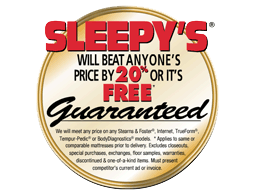 From the lost archive of unpublished Mouse Print* stories, circa 2007:
Mattress buying has always been a tricky proposition. You can’t easily compare prices and models of mattresses because bedding manufacturers assign unique style names to each store that sells its products.
That fact alone makes taking advantage of a store’s advertised price guarantee almost impossible.
Assuming you could find the exact same mattress elsewhere (or a comparable one if they allowed it), the Sleepy’s chain seems to make a pretty generous offer — they beat any competitor’s price by 20% or the bed is free.
*MOUSE PRINT: The guarantee, pictured above, exactly as it appeared [in 2007] on Sleepy’s homepage, has virtually unreadable fine print that substantially diminishes the guarantee’s coverage.
We will meet any price on any Stearns & Foster®, Internet, TrueForm®, Tempur-Pedic® or BodyDiagnostics® models. * Applies to same or comparable mattresses prior to delivery. Excludes closeouts, special purchases, exchanges, floor samples, warranties, discontinued & one-of-a-kind items. Must present competitor’s current ad or invoice.
They partially exclude two popular brands, Stearns & Foster and Tempur-Pedic, as well as any price you find online. Even in its TV ads, Sleepy’s promoted its price guarantee but failed to orally disclose its limitations.
Further, our trusty mouse is always irritated by any guarantee that promises to beat a competitor’s price by X amount, or you get the product free. What store in their right mind would rather give away a product completely free rather than merely reduce its price marginally below a competitor? That’s a guarantee that only sounds good until you think about for a minute.
Fast forward to 2014. Today, Sleepy’s price guarantee is nowhere to be found on its website. But, it is still appearing in some newspaper ads, under the same basic terms, but we’re happy to say in larger type:

ADV