Updated every Monday!   Subscribe to free weekly newsletter.

When Written Permission Can be Oral!

There is good news this week for everyone who has been annoyed by receiving prerecorded telemarketing sales calls (“robocalls”) at dinnertime, even if you are on the “do not call” list. Starting September first, an amendment to the FTC’s Telemarketing Sales Rule requires telemarketers to get your express written permission before they can make such calls. This even applies to people who are not on the “do not call” list.

Sounds great, right? Who is going to fill out a form, sign it, and mail it back indicating they want to get junk phone calls? Very few people. But leave it to lawmakers to be hip and allow “electronic signatures” to substitute for ones on paper under the so-called E-Sign act.

*MOUSE PRINT: What is an electronic signature?

The E–SIGN Act defines an ‘‘electronic signature’’ as ‘‘an electronic sound, symbol, or process attached to or logically associated with a contract or other record and executed or adopted by a person with the intent to sign the record.’’ 15 USC 7006(5). The Act further defines an ‘‘electronic record’’ as ‘‘a contract or other record created, generated, sent, communicated, received, or stored by electronic means.’’ 15 USC 7006(4).

So one might think that typing “John Doe” on a website is an electronic signature, and you would be correct. But things you would never expect to constitute a “written signature” qualify also.

*MOUSE PRINT: The following types of things would also qualify as an electronic signature, depending on the wording:

  • Clicking a link in an email
  • Clicking a “yes” button on a website
  • Pressing a key on a touchtone telephone
  • Orally saying “yes” in a telephone call that is recorded
  • So, getting you to agree “in writing” to receive robocalls may be easier for a telemarketer to accomplish than you originally thought.

    One method that would not comply with the law is to bury a statement of your agreement to receive such calls in a contract, such as in the terms and conditions of a credit card agreement. For example, last week, Chase sent some card holders a notice of change in terms, but it is not an acceptable method of gaining your written consent to receive robocalls:

    *MOUSE PRINT:

    “You authorize us, or anyone acting on our behalf, to call or send a text message to any number you provide or to any number where we reasonably believe we can contact you, including calls to mobile, cellular, or similar devices, and calls using automatic telephone dialing systems and/or prerecorded messages,or to send an email to any address where we reasonably believe we can contact you.”

    Chase and most others, however, are allowed to call you using a prerecorded message that is informational in nature (rather than sales-oriented), such as providing a balance update or a reminder that a payment is due soon.


    Updated every Monday!   Subscribe to free weekly newsletter.

    I’m a Mac, and I’m a PC — the Fine Print

    For a change of pace this week, we look at the lighter side of fine print.

    For over a year, Apple has been poking fun at PCs with a series of clever commercials showing a straight-laced, geeky PC guy and a cooler, hipper spokesperson for Apple. In the latest ad, every time the PC guy says something about the value of owning a PC, such as “you can’t just say getting started with a PC is the easiest thing in the world,” a chunk of unreadable fine print pops up on the screen.

    macpcfineprint

    The more the PC guy talks, the more the screen fills with mouse print. But what exactly do those disclaimers actually say?

    *MOUSE PRINT: Thanks to the folks at MacJournals.com, now we know.

    To remove unneeded bloatware first open uninstaller, select applications to remove, and uninstall. To remove optional components, click start, go to all programs and open control panel, select remove components, select components you want to remove, select next, when done, select finish. Once initial prep is complete, PCs may then be easy to use under certain controlled conditions and when properly maintained. In order for PCs to achieve optimal performance on a regular basis and for long periods of time, routine maintenance should include (but is not limited to) the following: download and install updated anti-virus software, run anti-virus software, check for system updates, clean out registry, defragment hard drive, free up disk space, remove temporary Internet files, empty the recycle bin, remove unnecessary programs, run error check utility and fix file system errors.

    And that is just part of the fine print. For the rest, visit MacJournals.

    Updated every Monday!   Subscribe to free weekly newsletter.

    In TurboTax vs. Consumers, Consumers Win

    turbotax08Please excuse the following unprofessional comment: the folks at Intuit who market TurboTax tax preparation software are a bunch of money-grubbing creeps. You will see why in a moment.

    The company decided to pull several fast ones on purchasers of their software this year, including by limiting the usability of their product in a way they never have before. On the back of the box is the following disclosure:

    MOUSE PRINT*:

    turbo08disclaim

    The little “4” refers to a virtually unreadable footnote that says “Product includes preparation, e-file, and print of 1 Federal return.”

    Translation: This year if you wanted to prepare a second return (say for a spouse or child) and merely print it on your own printer, Intuit was going to charge you $9.95 extra for each return beyond the first. What chutzpah!

    At the same time, on their website, they are claiming “NEW – Free federal efile included”:

    *MOUSE PRINT: What TurboTax does not tell you is they raised the price of the software by one-third from 2007 to 2008 to cover the “free” efiling.  Last year, TT Deluxe retailed for $44.95 and was commonly available for $39.95.  That price did not include $17.95 extra for OPTIONAL e-filing.  This year, Intuit raised the price of  TT Deluxe to $59.95, but included one “free” efiling. (For Costco customers last year, after a $15 coupon, the price was only $19.99. This year, the price actually doubled because the software went up to $49.99 there, and the coupon is only for $10 off that price.)  So in essence, customers have no choice but to pay extra for efiling whether they want to use it or not.

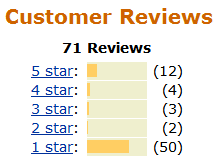
    These two policy and price changes caused an uproar. Consumers were livid that they had to pay $10 extra to print a second return on their own printer, and that they were being forced to pay for efiling via a $15 price increase for the product itself.  And for once, consumers found a way to get even.  They downrated TurboTax 2008 on Amazon, so that it was only rated as a one star product.

    turboreviews

    Then, on December 9, 2008, H&R Block announced that their competing software, TaxCut, would include completely free efiling without raising prices.  Intuit gave in to the pressure three days later and issued a press release allowing purchasers to print unlimited copies of returns for free on their own computers (offering refunds to anyone who paid the extra $9.95), and they now included FIVE efiles.  That is a bona fide savings compared to the $17.95 each they used to charge, but we are still paying $15 extra for that privilege.

    Unfortunately, Intuit has a history of trying to take advantage of consumers by deliberately disabling online functions for its Quicken software three years after issue thereby forcing customers to buy the software again; eliminating, reducing, or hiding rebates on certain software and thus raising prices; and giving away non-upgradeable software as a bonus (forcing the purchase of a more expensive edition in the future in order to view the already entered data).

    Here is this year’s hidden TurboTax rebate of $10.